Skip to Content

Warehouse control system (WCS) and WMS / ERP integration

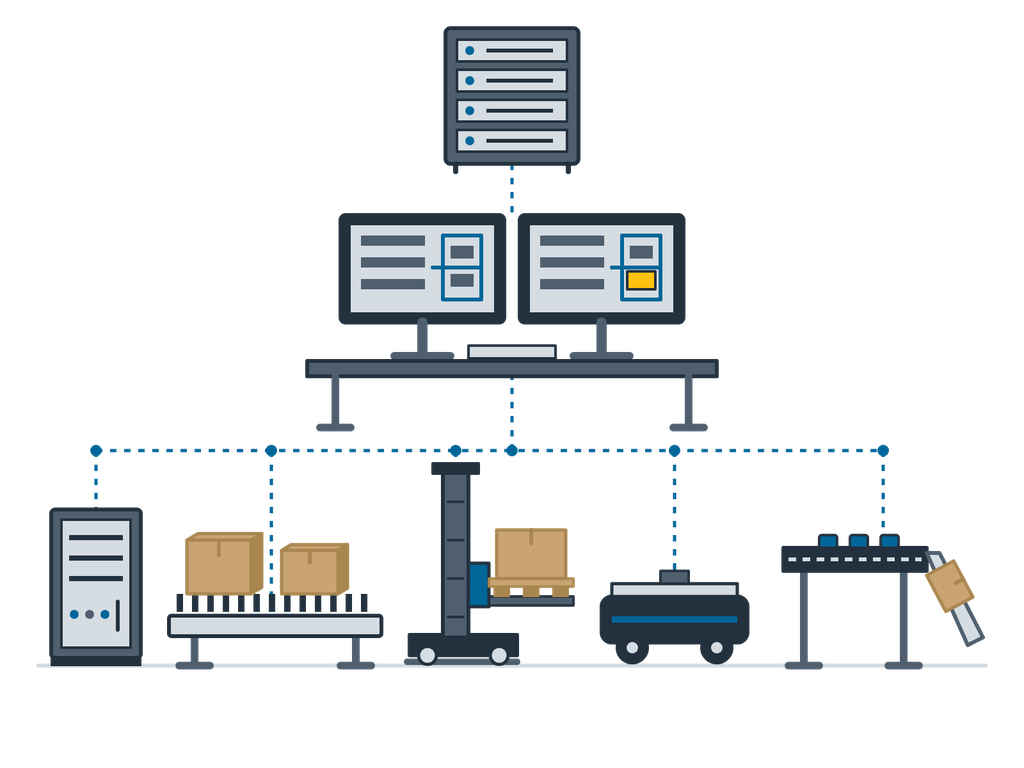
The control and dispatch software delivered with the equipment: it takes tasks from the WMS, dispatches conveyors, cranes, AGVs and sorters, and reports results back; it connects to your existing WMS and ERP.

The control and dispatch software delivered with the equipment: it takes tasks from the WMS, dispatches conveyors, cranes, AGVs and sorters, and reports results back; it connects to your existing WMS and ERP.

A WCS (warehouse control system) sits between the WMS and the automated equipment. The WMS manages orders, waves and stock; the WCS handles tasks only: it breaks each WMS task into instructions the machines can execute, dispatches them by machine availability, route availability and priority, lets several machines relay one task, and reports the results back to the WMS. If a route is blocked it switches to another; after a fault or restart it first checks whether a machine is carrying a load, then resumes from where it stopped. We do not sell our own WMS: the WCS comes with the equipment and connects to the WMS and ERP you already have. At companies in China where our team members worked before, they handled WCS interfaces and monitoring for cross-belt sorting and conveyors in a footwear distribution centre, and WCS dispatch with an SAP interface for a die-storage AS/RS (projects of those companies, not delivered under the EMMANUEL name).

Typical uses

  • Joint dispatch of AS/RS, conveyors, AGVs and sorters
  • Connecting new equipment to your existing WMS or ERP (including SAP)
  • Barcode reading, destination assignment and drop confirmation in sorting centres
  • Upgrading interfaces and dispatch software of older systems

How to choose

  • Which interfaces your systems offer: database staging tables, web services, API, file exchange or SAP RFC
  • Which machines must be dispatched together: conveyors, cranes, AGVs, sorters, their numbers and PLC brands
  • Peak task volume and response time: sorting has the tightest response requirements
  • Availability: hot standby and source-code delivery, per project

When it is not the right choice

  • Only one or two stand-alone machines run by operators: their own controls are enough; no separate WCS needed
  • You want to buy a WMS, or put order, stock and wave management into the WCS: we do not sell a WMS; the WCS executes the tasks your existing WMS sends

Key figures

Task dispatchTakes WMS tasks and splits them into machine instructions; dispatches by machine state, route and priority; machines can relay a task
Routes and exceptionsSwitches to another route if one is blocked; cancels tasks that cannot run and releases resources
RecoveryAfter a fault or restart, checks for a load on the machine and resumes from where it stopped
PLC linkCommonly TCP/IP socket with fixed-length packets: acknowledgement and retry on timeout, heartbeat, automatic reconnect; machine status can also run over OPC
WMS / ERP linkDatabase staging tables, web services, API, file exchange or SAP RFC, per project
MonitoringAnimated equipment view, fault markers, communication status, operation and job logs; with authorisation, start and stop machines, disable destinations or carriers
StatisticsEquipment utilisation, continuous running time, mean time between failures, exception rate and more

Figures are typical configuration ranges; exact specifications are set per project.

Options

  • Sorting: no-reads, multiple barcodes and invalid destinations sent to a reject or exception chute
  • Hot-standby servers
  • Browser view of equipment status
  • Source-code delivery (per project)
  • Role-based operator permissions

Scope of supply

  • Machine, drives and control cabinet, assembled and dry-run tested before shipping
  • The equipment's own control and fleet software; interfaces to your existing WMS / ERP as the project requires
  • Drawings: general arrangement, foundation and anchor plan, electrical schematics
  • Conformity documents for the equipment and the whole line, the split of responsibilities and the acceptance criteria are set out in the contract according to the project scope
  • Spare-parts list and wear-part recommendation; a first batch can ship with the equipment
  • Factory acceptance (FAT): attend in person or follow by live video
  • Installation, commissioning and operator training can be included in the offer

What we need for an offer

  • Name, version and available interfaces of your WMS / ERP
  • Equipment list: types, numbers, PLC brands
  • Peak task volume, response time and availability requirements
  • Network and IT-security requirements
  • Whether you need source code and hot standby

Related equipment

Request an offer for this equipment